![[Server] APM 컴파일 수동 설치 - (3/3) php 편](https://img1.daumcdn.net/thumb/R750x0/?scode=mtistory2&fname=https%3A%2F%2Fblog.kakaocdn.net%2Fdna%2FbnBLfl%2Fbtq9eNMz9iu%2FAAAAAAAAAAAAAAAAAAAAAPrsvng7VMRvfnQ_Bs5sskwKPeP4E4lLXsJ8bRr-Y8-8%2Fimg.png%3Fcredential%3DyqXZFxpELC7KVnFOS48ylbz2pIh7yKj8%26expires%3D1772290799%26allow_ip%3D%26allow_referer%3D%26signature%3D3%252FnE%252FXsTqKXJ6b9FCrEISlMjRL8%253D)
1. php 컴파일 설치를 위한 패키지 설치
/usr/local# apt-get install libxml2-dev /usr/local# apt-get install libjpeg-dev /usr/local# apt-get install libpng-dev /usr/local# apt-get install libsqlite3-dev
2. php설치 (7.4.1)- 압축 파일 다운 & 압축 해제
/usr/local# wget https://www.php.net/distributions/php-7.4.1.tar.gz /usr/local# tar xvfz php-7.4.1.tar.gz
/usr/local/php-7.4.1# ./configure \
> --with-apxs2=/usr/local/apache2.4/bin/apxs \
> --enable-mysqlnd \
--with-mysql-sock=mysqlnd \
--with-mysqli=mysqlnd \
--with-pdo-mysql=mysqlnd \
--with-imap-ssl \
--with-iconv \
--enable-gd \
--with-jpeg \
--with-libxml \
--with-openssl
configure 중 error
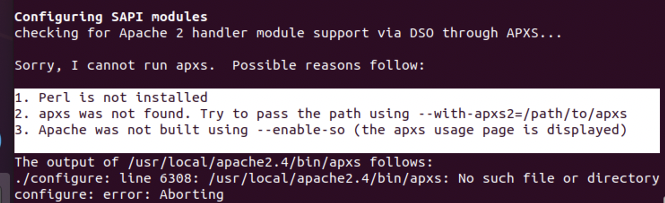
내 디렉토리가 apache2 여서 발생한 오류 .. 막 복붙하면 이렇게 됩니다
solve —> ./configure —with-apxs2=/usr/local/apache2/bin/apxs --enable-mysqlnd --with-mysql-sock=mysqlnd --with-mysqli=mysqlnd --with-pdo-mysql=mysqlnd --with-imap-ssl --with-iconv --enable-gd --with-jpeg --with-libxml --with-openssl
/usr/local/php-7.4.1# make
/usr/local/php-7.4.1# make test
make test 시
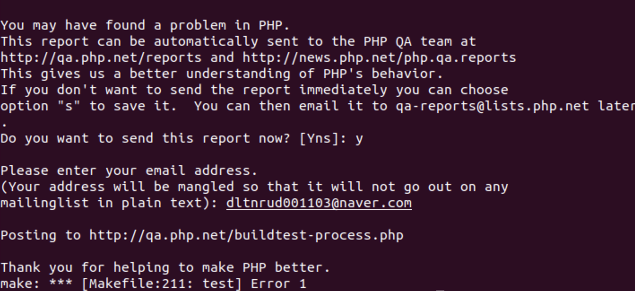
make install 완료
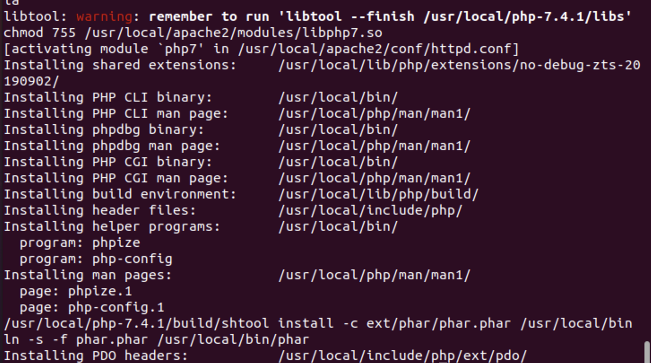
3. Apache와 php 연동
아파치 설정파일인
(httpd.conf)를 열어서 php 모듈이 정상적으로 설치되어있는지 확인
/usr/local# vi apache2.4/conf/httpd.conf
httpd.conf 의 min_module 에 AddType application/x-httpd-php .php .html 을 추가
. . .
AddType application/x-compress .Z
AddType application/x-gizp .gz .tgz
AddType application/x-httpd-php .php .html //추가
#AddHandler allows you ti map certain file extension to “handlers”:
. . .
4. php.ini 파일 세팅
php.ini : php의 설정 파일
php configure 시, php.ini 위치를 지정해 두지 않으면 기본으로 /usr/local/bin/php.ini를 사용한다. 따라서 production 시스템용 설정 파일인 php.ini-production 파일을 /usr/local/lib/php.ini 에 복사
→ /usr/local/php-7.4.1# cp php.ini-production /usr/local/lib/php.ini
5. php test file 작성
/usr/local/apache2.4/htdocs# vi phpinfo.php
<?php
phpinfo();
?>
—> 띄어쓰기를 이상하게 할 시 페이지가 뜨지 않으므로 조심!!
Apache 실행하여 실행되고 있는지 확인
/usr/local# apache2/bin/httpd -k start /usr/local# ps -ef | grep httpd | grep -v grep /usr/local# netstat -anp | grep httpd /usr/local# curl http://127.0.1.1 —>curl을 사용하여, 해당 domain의 html 파일을 가져와 확인가능
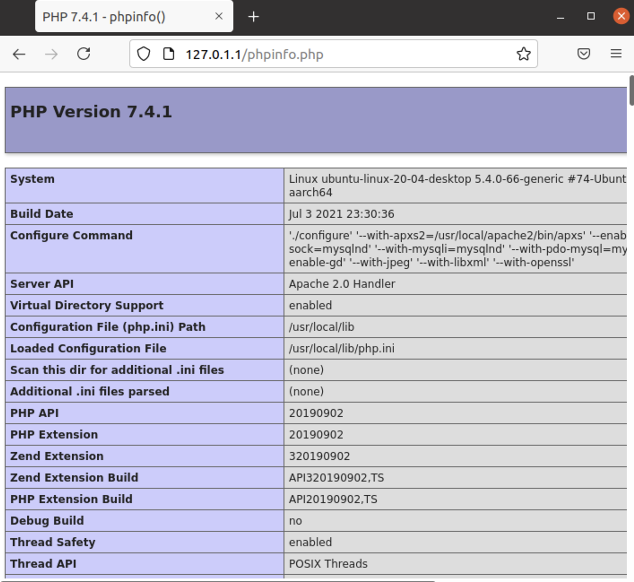
참조링크: https://well-made-codestory.tistory.com/7?category=945063
https://headf1rst.github.io/back_end/APM-PHP-install/ 산하오빠꺼 추가
'[Server]' 카테고리의 다른 글
| [Server] AWS 서버 구축 - gabia로 도메인 적용하기 (0) | 2021.07.11 |
|---|---|
| [Server] AWS Server 구축 - Mysql 외부 접속 with Workbench (0) | 2021.07.10 |
| [Server] Mac -AWS 서버 구축 - nginx, php, mysql 설치, phpmyadmin 설치 (0) | 2021.07.10 |
| [Server] Local server 구축 - 외부 ip에서 Local server 접속하기 (0) | 2021.07.10 |
| [Server] APM 컴파일 수동 설치 - (2/3)mysql편 (0) | 2021.07.09 |